Red Hat Advanced Cluster Security for Kubernetes: A Comprehensive Overview
20 Jun 2022
Prepared by: Sultan Öztürk – SEKOM SD-X & Cloud Technologies Engineer
In 2021, we published an article titled “Red Hat StackRox Security – Securing Cloud-Native Applications and Containers,” where we discussed Red Hat’s acquisition of StackRox and the innovations it introduced. Now rebranded as Red Hat Advanced Cluster Security for Kubernetes, StackRox is referred to simply as CS by Red Hat. CS focuses on securing Kubernetes pods, images, runtimes, hosts, and infrastructure.
When we consider monolithic applications, they typically run on virtual servers, where we are already familiar with security measures. However, with the transition to microservices, container structures emerged, necessitating more advanced and detailed security measures.
Kubernetes-native security applications provide several key benefits: enhanced security, identifying blind spots, early threat detection, preventive actions, cost and time efficiency, and minimizing analysis effort while maximizing developer productivity.
Red Hat, with OpenShift, already offers a secure platform — including a dedicated CoreOS operating system, Kubernetes infrastructure, custom network flows, and secure external application exposure measures.
Now, Red Hat has added StackRox to its portfolio, reaching a declarative security structure. This setup allows for:
- Listing vulnerabilities in existing network flows
- Recommending solutions
- Identifying suspicious processes
- Monitoring their frequency
- Determining if vulnerabilities are part of the baseline or represent anomalous behavior
The goal is to implement security from the development stage and bring the “born secure” concept to life. StackRox can be integrated into CI/CD processes, ensuring:
- Applications are not run with root privileges
- Deployment processes are blocked if potential security vulnerabilities are detected
- The “born secure” concept is applied throughout all stages until the application goes live
This approach emphasizes the importance of collaboration among Developer, Security, and Operations (DevSecOps) teams.
Features of Red Hat StackRox
Through its interface, StackRox offers the following features:
- Image Scanning: Integrates with tools not originally included in OpenShift, such as Anchore, Google Cloud Container Analysis, Quay, Clair, etc.
- Integration with CI/CD tools like Jenkins and CircleCI, and notification systems, providing security teams with detailed inspection and analysis capabilities for pods, namespaces, and clusters.
Red Hat also welcomes you with a Dashboard in the StackRox interface, similar to its other products, where you can view your cluster information in a summarized format and customize it as desired.

In the Compliance section, you can list compliance with widely recognized standards such as CIS, NIST, PCI, and HIPAA, scan your deployments, take actions accordingly, and even present your reports in PDF or CSV format to auditors directly from this interface.
In the Policy Management screen, which you can modify and add new policies as needed, you can view built-in policies such as deployments not scanned for 30 days, images older than 90 days, and more.

In the Violations section, you can list actions that have triggered your previously created policies. You can conduct a detailed analysis of occurrences such as:
- Commands like curl or wget used within an image
- Access permissions opened to external users
- Downloaded content, the lifecycle stage, and the specific time of the action
Additionally, you can exclude certain policies from being flagged as violations for specific deployments as per your requirements.
In the Risk section, a cluster risk profile is generated based on previous results. Applications are ranked from highest to lowest risk, providing detailed insights into namespace, environment, and the processes executed within that environment.

In the Vulnerability Management screen, you can view a list of the most violated policies, the highest-risk images, and the weakest points in your infrastructure. The reporting feature, available on almost every screen, is also present here.

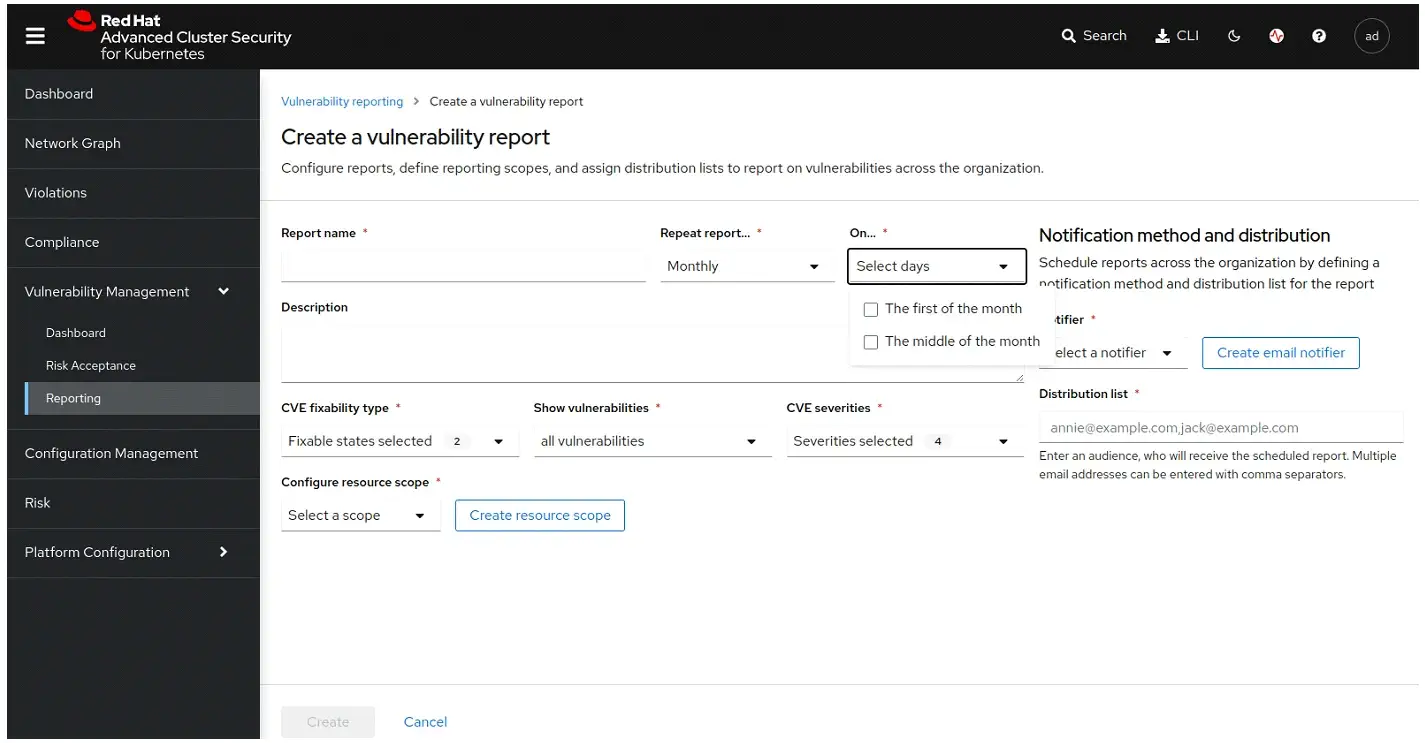

With the latest version, you can even schedule reports to be automatically generated and emailed to you daily, at the beginning or middle of the month, providing consistent monitoring and updates.
In the Network Graph section, you can analyze the network graph of your application environment, including access points, associated service accounts, namespaces, deployments, and traffic between pods.
You can also simulate network changes, generate and apply a new network policy YAML file, and download it instantly.
You have the ability to list replicas, labels, project names or namespaces in Kubernetes, network protocols (TCP/UDP), and ports in a single view.
Lastly, in addition to its many detailed features, you can also view violations and suggested actions for pipeline logs generated through the OpenShift Pipelines integration in this section.


For more information about Red Hat OpenShift and all your SD-X & Cloud needs, get in touch with our expert team today!
Other Posts
AI Datacenter Network Architecture | Why the Fastest GPUs Are Not Enough: The Defining Role of Network Infrastructure in AI Workloads
Meet Sekom at MWC2026 Barcelona: Network Intelligence for Real-World Operations
Ensuring Reliability and Governance in Artificial Intelligence: A Guardrail-Driven Security Framework
See all posts