Firewall Changes Required for Container Image Pull Operations
04 Apr 2023
Giray Baha Kezer – Sekom – SD-X & Cloud Technology Engineer & Alperay Burak Keleş – Sekom – SD-X & Cloud Technology Engineer

Are You Ready for the Upcoming Changes in Red Hat Container Image Pull Process?
With an announcement made by Red Hat on March 8th, it was disclosed that the Red Hat Container Image Registry addresses will change. Therefore, Red Hat customers are advised to make changes to their firewall/proxy rules in their enterprise infrastructure by May 1, 2023, to avoid interruptions in container image registry access.
Points to Be Updated
Currently, all image manifests and filesystem blocks are served directly from registry.redhat.io and registry.access.redhat.com addresses. Due to the upcoming changes, filesystem blocks will now be served from Quay.io. To prevent issues in container image pull operations, it will be necessary to allow TCP connections on ports 80 and 443 for the following domains:
- cdn.quay.io
- cdn01.quay.io
- cdn02.quay.io
- cdn03.quay.io
These changes should be made to the firewall configurations where the necessary permissions were previously granted for the addresses registry.redhat.io and registry.access.redhat.com. With these adjustments, container image pull operations can continue from the above-mentioned addresses. It is not necessary to log in to Quay.io or interact directly with the Quay.io registry for continuing Red Hat container image pull operations.
If the instructions during the OpenShift setup were followed correctly or if the Quay.io registry was used, the firewall configurations are likely already properly adjusted. Products like Red Hat Ansible Automation Platform or Red Hat Satellite may require firewall or proxy changes.
It is recommended to use hostnames instead of IP addresses when configuring firewall rules. For more information, refer to Applying IP Address Filtering to Red Hat Container Registries.
Why Is This Change Being Made?
Since June 2022, Red Hat OpenShift operator index images have been provided via registry.redhat.io using a Quay.io backend. OpenShift installation instructions required access to Quay.io and CDN servers, but no additional steps were needed for the product itself. Now, this approach is being extended to all Red Hat container images, allowing users to benefit from the high availability and simplicity features of Quay.io registry.
Test
To ensure that image pull operations are working correctly before the changes are applied, you can pull the image “registry.redhat.io/redhat/redhat-operator-index:v4.12” from Quay.io. This operation can be performed using the relevant commands with Customer Portal credentials.
If the image is pulled successfully, the command echo $? will return “0”.
Additional Information
Apart from the changes, many things will remain the same:
- Container features will remain unchanged, so images can still be pulled using “registry.redhat.io” and “registry.access.redhat.com”.
- Red Hat container images will continue to be signed in the same way and with the same keys.
- Container image manifests will be served directly from “registry.redhat.io” and “registry.access.redhat.com”. Redirections will only be made to the Quay.io CDN for configuration and filesystem blocks.
- To pull an image using sha256, schema 2 must be used. (For more detailed information, click here.)
- Image tags, schema 2, image identities, and signatures will remain unchanged.
- Images pulled before the changes will still be valid and do not need to be pulled again.
- No changes are required regarding ImageContentSourcePolicy for OpenShift or Kubernetes clusters.
- No need for node restarts, cache changes, or any upgrades for OpenShift or Kubernetes clusters.
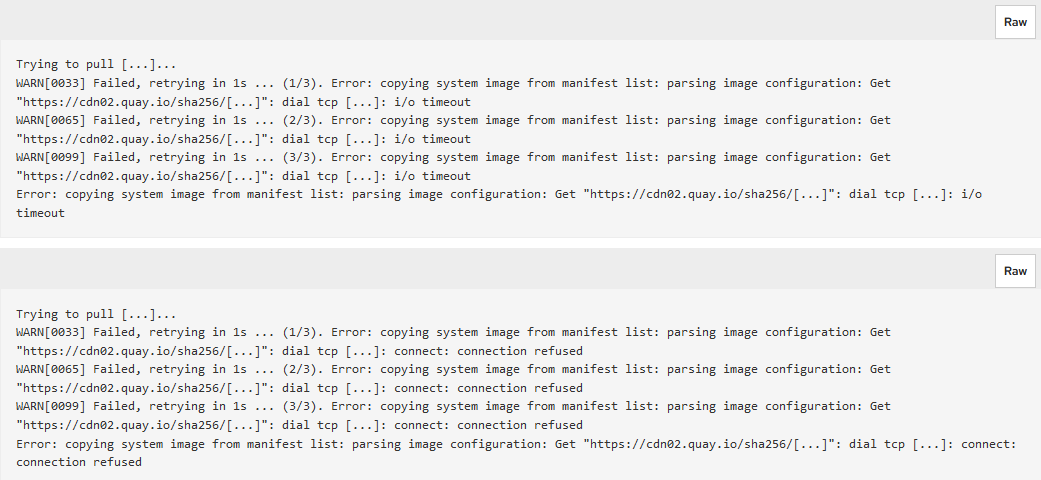
Allowing outbound connections with the above hostnames can solve the following issues, depending on different firewall configurations:
- “Connection refused” error when pulling images.
- I/O timeout errors when pulling images.
- ImagePullBackOff status when pulling images in OpenShift or Kubernetes clusters.
The following examples show the errors that can be encountered using the “podman pull” command with different firewall configurations:
If you need support on this topic, our team of skilled and experienced experts is here to assist you. All you need to do is visit our expertise page and fill out the contact form!
Other Posts
What is BGP? Route Advertisements and the Backbone of the Internet
AI Datacenter Network Architecture | Why the Fastest GPUs Are Not Enough: The Defining Role of Network Infrastructure in AI Workloads
Meet Sekom at MWC2026 Barcelona: Network Intelligence for Real-World Operations
See all posts