Welcome to the World of Webex Calling
09 Feb 2022
Webex has evolved far beyond being just a “web conferencing software” and has become a comprehensive communication platform that integrates conferencing, messaging, hybrid, and cloud-based communication infrastructure. With Webex Calling, you now have access to a powerful platform where you can manage all your devices through a cloud-based admin portal enriched with reporting and analytics modules.
What Webex Calling Offers
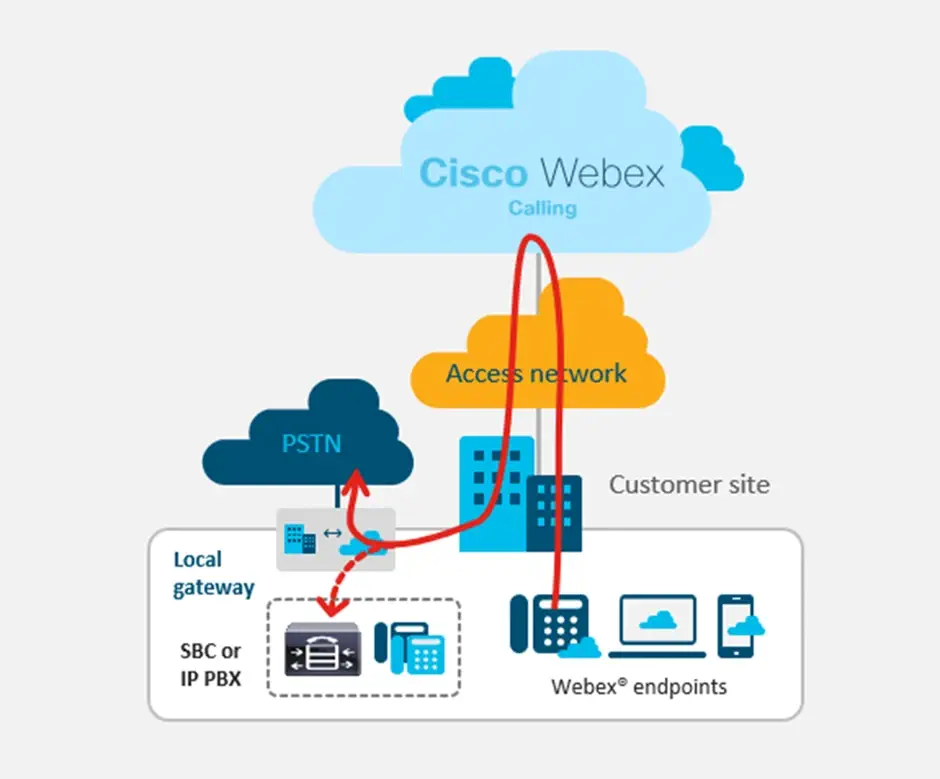
Before Webex Calling, making calls to external PSTN numbers required a hybrid structure and the integration of Cisco Unified Call Manager (CUCM) with your cloud infrastructure. Now, with Webex Calling, you can leverage a Local Gateway to manage PSTN lines without the need for an on-premise PBX system.

Key Features of Webex Calling
- PSTN Integration: Easily connect PSTN lines using a Local Gateway, eliminating the need for traditional on-premise PBX systems.
- Auto-Attendant: Create customized welcome announcements to greet callers and direct them to the appropriate departments or extensions.
- Centralized Management: Manage all devices through a cloud-based admin portal with real-time reporting and analytics.
With these advanced features, Webex Calling simplifies communication management while enhancing overall user experience and operational efficiency.

Seamless Transition to the Cloud with Webex Calling
Before Webex Calling, only video conferencing devices could be registered to the Webex platform, while desktop IP phones remained excluded from cloud integration. However, with the latest updates in Webex Calling, you can now effortlessly migrate your IP phones to the cloud.

To enable cloud integration for IP phones, simply perform an MPP firmware migration. This process allows your existing IP phones to connect seamlessly to the Webex cloud, providing centralized management, advanced calling features, and a unified communication experience.
Benefits of Migrating IP Phones to the Cloud
- Centralized Management: Manage all devices from a single cloud-based admin portal.
- Advanced Calling Features: Access enhanced calling features previously only available to video conferencing devices.
- Scalability: Easily add new devices without the need for additional on-premise infrastructure.
With Webex Calling, transitioning your IP phones to the cloud not only streamlines operations but also extends the platform’s capabilities to cover all communication devices.
In cases where you are setting up a new phone system from scratch, you can complete the activation of your phones individually or in bulk within seconds.

Through the Webex Calling Administration Portal, you can perform the same detailed configurations previously managed via Cisco Unified Call Manager — such as call features, locations, sites and groups, device configurations, and routing plans — allowing you to seamlessly transition all your on-premise practices to the cloud.
You can also adjust your call plans using the same prefixes and permissions as before, ensuring a smooth migration to the cloud without altering the user experience.
In summary, by investing only in Endpoints and a Local Gateway, you can migrate your entire communication infrastructure to the cloud. You can integrate your PSTN number with the cloud infrastructure and register your IP phones. The DID numbers assigned to Webex users, IP phones, and video conferencing devices enable both inbound and outbound calling capabilities.
For all these reasons, it’s safe to say that there are no longer any barriers to moving to the cloud.